A Clearer Way to Manage Every Order: Inside the Finished Goods Client Portal
Tour the Finished Goods client portal: track order pipeline stages, approvals, shipments, invoices, and balances in one workspace built for brand operators.
A Clearer Way to Manage Every Order: Inside the Finished Goods Client Portal
Managing a product program should not require piecing together the story from emails, spreadsheets, shipping updates, invoice threads, and status calls. When multiple orders are moving through production at once, the questions add up quickly:
- Has the order been approved?
- Is artwork ready?
- What is in production?
- When will it ship?
- Which invoices are still outstanding?
- What needs attention today?
The Finished Goods Client Portal brings those questions into one organized workspace.
Built to give customers a clearer view of their active programs, the portal makes it easier to follow orders from their earliest stages through final delivery. Instead of chasing updates across separate conversations, teams can review order status, approvals, shipments, financial information, and planning tools in one place.
It is a practical way to stay connected to the work already in motion, and to make more informed decisions about what comes next.
One View of the Full Order Pipeline
At the center of the portal is the order pipeline: a high-level view of active orders organized by stage. This gives teams a fast way to understand the overall state of their programs before diving into individual order details.
Orders can be viewed across key milestones, including:
- In Production
- Ready to Ship
- Awaiting Pickup
- On Water
- In Transit
- Delivered
That stage-based structure gives customers a straightforward way to identify where every order stands in its lifecycle.
For a growing brand, this matters. A single program can have products in development, orders awaiting signature, finished goods waiting for pickup, and shipments already in transit, all at the same time. Without a shared view, it is easy for critical details to be buried in day-to-day communication.
The portal makes the pipeline easier to scan. Teams can see the volume of active orders at each stage, understand which programs are advancing, and quickly focus on the areas that require a closer look.
Order Details That Support Better Decisions
A stage label tells part of the story. The details behind each order help complete it.
Within the portal, customers can review essential program information including:
- Sales order number
- Deal name
- Quantity
- Shipping method
- Customer PO
- Order date
- Production-complete date
- Ship date
- Estimated delivery date
- Shipment status
- Tracking information
- Remarks
- Shipping address
Having these details together makes it easier to answer operational questions without unnecessary back-and-forth. A customer can confirm whether an order is in production, see its expected delivery timeline, review the shipping method, or reference order-specific notes directly from the same workspace.
The portal is also designed to support different ways of working. Customers can filter orders, choose which columns are most relevant to their team, and export order information when they need to work with it outside the portal. That flexibility helps teams focus on the exact information that matters to the decision in front of them.
Whether the goal is preparing for a delivery, reviewing a purchase order, or coordinating with internal operations, a complete order view helps teams move with more clarity.
Keep Approvals and Signatures in Sight
Small actions can have an outsized impact on an order timeline. An unsigned order, an artwork approval, or a production-related review can become a bottleneck if it is not visible to the right person at the right time.
The Finished Goods Client Portal includes a dedicated view for unsigned orders, making it easier to identify items that are awaiting signature. This provides a clear starting point for teams that need to review outstanding actions and keep programs progressing.
The portal also surfaces order remarks and status context, helping customers understand where an item stands and what may be needed next. For example, a pre-production order may be in artwork review or tooling, while an order in draft may still be awaiting a required signature.
By making these steps easier to find, the portal supports a more proactive operating rhythm. Teams can spend less time asking what needs attention and more time acting on it.
Follow Shipments Through Delivery
Once an order leaves production, visibility remains just as important. Shipping timelines, carrier activity, customs movement, and delivery dates all affect planning on the customer side.
The portal gives customers a clear way to follow orders as they move from production complete to shipped, customs, and delivered. Shipment status, tracking information, ship dates, and estimated delivery dates are available alongside the rest of the order record, so customers can see the broader context around every shipment.
That visibility is valuable for teams coordinating:
- Inventory
- Warehouse receiving
- Launches
- Retail commitments
- Internal planning
Knowing that an order is ready to ship is different from knowing that it is in transit. Knowing that it is in transit is different from knowing its estimated delivery date or carrier tracking status.
By keeping these milestones organized within the order workflow, the portal helps customers maintain a clearer view of where goods are headed and when they may arrive.
A Clearer Picture of Invoices and Balances
Order visibility is only one part of managing an active product program. Financial visibility matters, too.
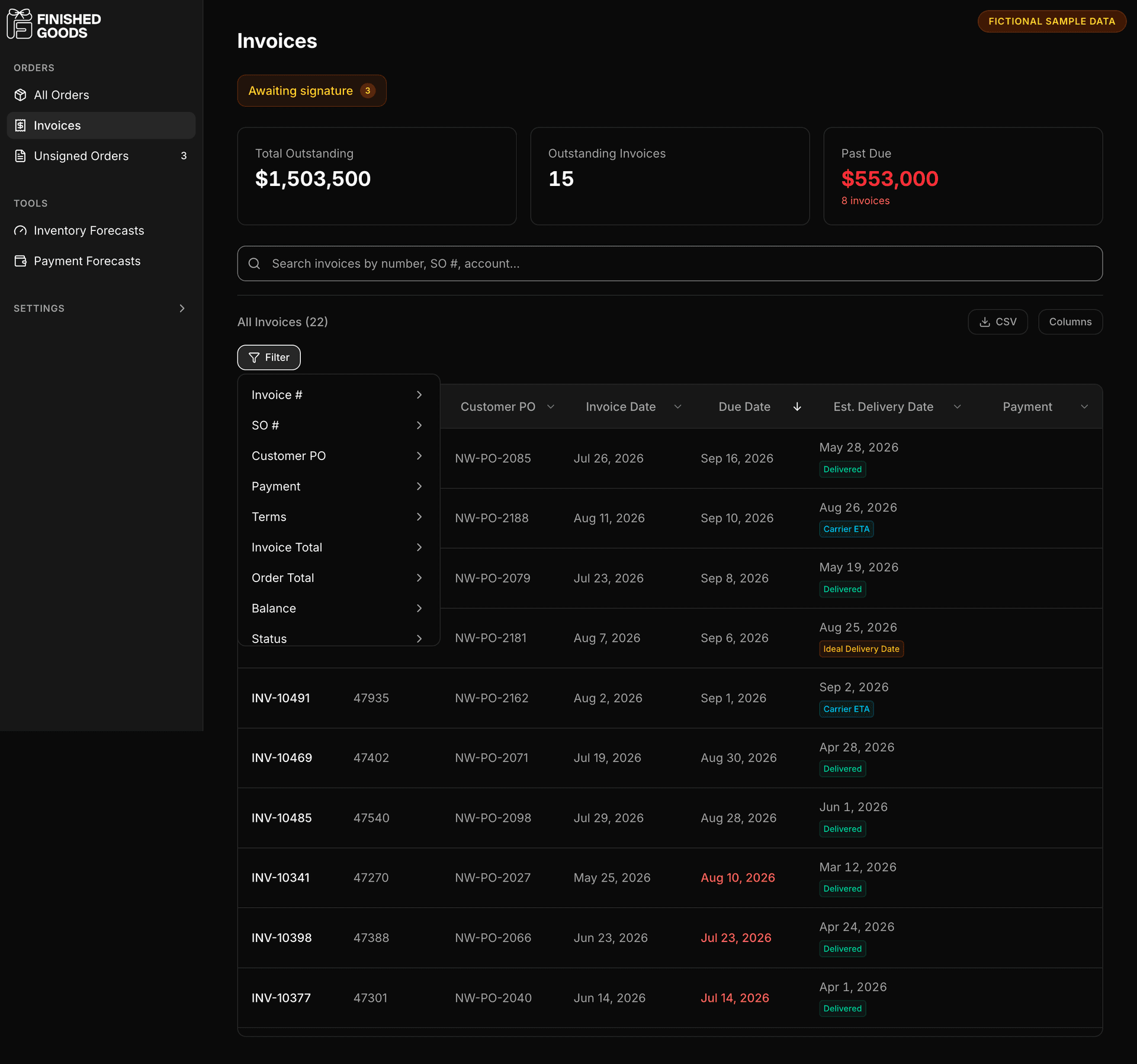
The portal includes an invoice view that helps customers review:
- Outstanding balances
- Invoiced amounts
- Not-yet-invoiced amounts
- Outstanding invoices
- Past-due items
Instead of treating financial questions as a separate process, customers can access this information within the same environment where they monitor orders and deliveries.
This makes it easier for teams to prepare for payments, coordinate internally, and stay aligned on the financial side of active programs. A customer reviewing their order pipeline can also see the related invoice picture, giving them a more complete understanding of what is in motion.
For finance, operations, and leadership teams, that shared access can simplify coordination. Everyone does not need to work from separate versions of the same information. The portal creates a common place to review what has been invoiced, what remains outstanding, and what may require follow-up.
Plan Ahead with Forecasting Tools
A strong operating view should not only explain the current moment. It should help teams prepare for the next one.
The Finished Goods Client Portal includes Inventory Forecasts and Payment Forecasts to support forward-looking planning. These tools give customers another layer of visibility beyond individual order records, helping them consider upcoming inventory requirements and financial commitments.
Forecasting does not replace thoughtful planning or customer strategy. It does, however, give teams a more organized place to begin those conversations. When order status, delivery timing, invoices, and forecast views are all available through the same portal, teams can connect the operational details to the decisions ahead.
This can be especially helpful for customers balancing:
- Multiple product programs
- Incoming deliveries
- Future production needs
- Payment schedules
A clearer view of the pipeline supports more deliberate planning and helps reduce the uncertainty that comes from working across disconnected sources of information.
Built for the Teams Behind the Product
The portal is not simply a reporting tool. It is a shared workspace for the people responsible for keeping a program moving.
- Operations teams can use it to monitor production and shipping progress.
- Finance teams can review invoice status and outstanding balances.
- Brand and product teams can follow approvals and pre-production milestones.
- Leadership can see the broader order pipeline and understand what is moving through the business.
Because the same core information is accessible in one place, the portal helps create a more consistent starting point for internal conversations. Instead of spending time determining which update is current, teams can begin with the status of the order itself.
That does not eliminate the need for partnership, communication, or expert support. It makes those conversations more productive by giving everyone a clearer view of the relevant details.
Less Guesswork. More Control.
Every product program includes moving parts. Orders change stage. Approvals need attention. Production completes. Shipments move. Invoices come due. Delivery dates influence the next decision.
The Finished Goods Client Portal helps bring those moving parts into focus.
With visibility across order stages, order details, approvals, shipments, invoices, and forecasts, customers have a more organized way to follow the work that matters to their business. The result is not more information for information's sake. It is a clearer operating view - one that helps teams spend less time chasing updates and more time moving forward.
Access your Finished Goods Client Portal to view your active orders, upcoming actions, and the next steps in your pipeline.